Showing posts with label EXISTS. Show all posts

Saturday, 20 December 2014

IN / NOT IN vs EXISTS / NOT EXISTS vs INTERSECT / EXCEPT vs JOIN (Part 2)

EXISTS and NOT EXISTS:

We've already discussed IN and NOT IN in part 1.  We'll use the same examples tables from there, so please run those statement to create the temporary tables that we'll be using.  Everything below was done in SQL Server 2012.

EXISTS:

Exists is slightly different to IN.  It returns a true predicate as long as one row is returned from within the subquery, whereas an IN statement will match all values from the outer query to the values from the inner subquery.  So you should be able to see right away the benefit of using EXISTS over an IN statement.  All that SQL Server needs to do is find one row, then it can stop searching for further matches within the inner subquery.  This is commonly referred to as short circuiting and can make for a much faster query.

EXISTS also allows you to match against more than one column, whereas you would have to use multiple IN statement to achieve the same thing with IN, which would be very costly.  Have a look at the below example.  Try adding a second predicate in the subquery.

select *
from #products
where exists
(
select *
from #orderItems
where productName = #products.productName
);

Quite often I have seen developers avoid using a * in the inner subquery thinking this will produce less overhead.  For example putting in a "SELECT 1" instead.  There is no need to do this.  Remember the EXISTS is simply checking to see if a row from the subquery is returned.  It doesn't care about the columns, so doesn't include them anyway.  Try running one against the other and checking out the execution plans.  You'll see they will be exactly the same.

Of interest: You'll also notice in the execution plan, that it's done a TOP (1) on the subquery.

NOT EXISTS:

NOT EXISTS is similar to EXISTS, of course, but will only evaluate as true if NO results are returned by the subquery.  Try the following:

select *
from #products
where not exists
(
select *
from #orderItems
where productName = #products.productName
);


Now we don't have the same problem that we had with NOT IN when it returned nulls.  But what if we wanted to compare two similar tables to see if any rows differ.  For example, you are bringing in data from one system to another, but don't want to insert or update any rows if an exact matching row already exists in the destination table.

Let's make another product table and alter some of the data:

insert into #products (productName,price) values (null,0);
select * into #products2 from #products;
update #products2 set productName = null where productID = 6;

Now lets try and highlight any rows that differ between the two product tables when comparing against ProductID and ProductName:

select productID,productName from #products p1
where not exists
(
select *
from #products2
where productID = p1.productID
and productName = p1.productName
);

This returns the following:
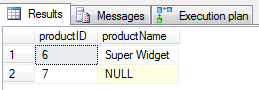
Not Exists Comparison Results


Row 1:  Great.  It recognised that product 6 was different.  #Product2 had the product name for this item as null.  #Product did not.

Row 2:  Not what we wanted.  Product 7 is exactly the same in both tables, so why has it shown up here.  Remember what we discussed in the previous post about nulls and that they essentially mean "unknown."  When comparing two unknowns, the end result will also be unknown.  So it cannot match the two.

You could of course use the ISNULL function for both ProductName columns, but this adds overhead, especially if you have many columns to compare.

This leads us on nicely to the next chapter where I will go over EXCEPT and INTERSECT.

Till then, MERRY CHRISTMAS!

Saturday, 2 August 2014

IN / NOT IN vs EXISTS / NOT EXISTS vs INTERSECT / EXCEPT vs JOIN (Part 1)

There are a number of ways of filtering your data according what exists or doesn't exist in another table or result set.  These are:

  1. IN and NOT IN
  2. EXISTS and NOT EXISTS
  3. INTERSECT and EXCEPT
  4. LEFT JOIN

In this series I will address the pros and cons of each, and how they handle nulls. I won't be discussing how you use them, but rather what they do and when to use them.

Let's start by prepping the tables that we'll use in the examples:

create table #orderItems ( orderItemID integer identity (1,1), productID integer, productName varchar(100), itemTotal decimal(6,2));
create table #products ( productID integer identity (1,1), productName varchar(100), price decimal(6,2));
insert into #products (productName,price) values ('Big Widget',39.99), ('Small Widget',12.95), ('Widget Multipack',72.95), ('Black Widget',14.99), ('Big Widget',39.99),  --Duplicate ('Super Widget',99.99);
insert into #orderItems (productID,productName,itemTotal) values (1,'Big Widget',35), (2,'Small Widget',12.95), (1,'Big Widget',39.99), (2,'Small Widget',12.95), (1,null,35), (5,'Super Widget',99.99);

The examples below will all be attempting to find the products that have had an order, or products that have not.  Note we have one duplicate product and we have one orderItem that has a null productName.  It's not very normalised, but for the purpose of this exercise we'll be matching on productName.

IN and NOT IN

These essentially just create a long list of AND or OR clauses and will of course return all rows, regardless of duplicates, from the containing query that match (or do not match) the resulting values from the subquery.  Lets look at IN first:

The following two queries are synonymous.  The second query is just to illustrate the logic of how the IN operator works.

select * 
from #products
where productName in (select productName from #orderItems);

select * 
from #products
where productName = 'Big Widget'
or productName = 'Small Widget'
or productName = 'Big Widget'
or productName = 'Small Widget'
or productName = null
or productName = 'Super Widget';  

The IN operator essentially creates a bunch of OR EQUAL TO conditions and a result is returned.  Now let's try NOT IN.

Again, the following two queries are synonymous:

select * 
from #products
where productName not in (select productName from #orderItems)

select * 
from #products
where productName <> 'Big Widget'
and productName <> 'Small Widget'
and productName <> 'Big Widget'
and productName <> 'Small Widget'
and productName <> null
and productName <> 'Super Widget';

Now for a NOT IN, it creates AND NOT EQUAL TO conditions.  Because these are now AND conditions, all of the results have to equate to true.  What happens when you run either of these queries?  What did you expect? Instead of seeing the two products that have no orders as you might expect, there are no results at all.  Can you see why? Remember that a null is an unknown value.  Nothing can equal, or not equal, an unknown.  So "productName <> null" does not return as true and because all results in the subquery set must be true, no result is returned.

Summary:

  • Be wary of nulls when doing a NOT IN.  Know your data if you plan on using NOT IN.
  • All rows will be returned. If you wanted distinct product names you would would have to use something like a distinct statement.
  • You can only match on one column.


Next:  EXISTS and NOT EXISTS

Deploying out of hours shouldn't be a thing

Getting code into production should not be hard. Nor should it have to be scheduled for special times. I have recently been involved with th...